IB CS SL G11 Monthly Reflection (Sep) — October 8, 2019

IB CS SL G11 Monthly Reflection (Sep)

Introduction

Last month, in computer science Sl, we mainly went through the Topic 2 of the book “CORE COMPUTER SCIENCE“. This chapter has five subtopics: computer architecture, secondary memory, operating and application systems, computer organization, and simple logic gates. This reflection will focus on each content’s definition with examples and graphs provided. The content of the reflection was adapted directly form the text book.

  • Computer architecture
    • The central processing unit and its element
    • RAM and ROM
    • The cache memory
    • The machine instruction cycle
  • Secondary memory
    • Persistent storage and secondary memory
  • Operating and application systems
    • Functions of an operating system
    • Software application
  • Computer organization
    • Bit, byte, binary, decimal and hexadecimal
    • Data representation
  • Simple logic gates
    • Boolean operators; Truth table using Boolean Operators; Logic and Venn diagrams using logic gates

Computer architecture

Computer systems consist of hardware and software components and follow the concept of “input, process, output and storage model“.

–“Core Computer Science
The input, process, and output model (retrieved from the Core Computer Science)

The graph above indicates the basic model of computer system. A computer system takes in some data as input. Then the computer system processes the data in a manner that the user has requested through set of step by step instructions, and outputs the result in some specific form. During the processing phase, other data, may be needed apart from the inputted. This data will exist in the storage of the computer system and will be fetched during the processing phase. Furthermore, the result and any new data that may arise from the processing phase may also be saved in the storage.

One example of the computer system is the printer. The input is the press on the “print” button on the printer. The process that the computer system inside a printer performs is to display ink on certain position according to the file instructed on a piece of paper. This task requires the original file as the template which is located usually in a secondary memory that is attached by the printer and instructions pre-existed in the storage. Finally the output is the piece of paper printed, which is not saved on the memory in this case, but in most cases, the output is saved in storage.

The central processing unit and its elements

Data or instructions that are processed in the computer system are actually processed by the central processing unit, also known as the CPU. The CPU is a hardware component of a computer system and can perform basic arithmetic, logical or input/output operations, in order to process data from input devices into useful information, the CPU is the “brain” of a computer system and can process data very quickly but can only process data by following instructions-it cannot think for itself.

The CPU contains the:

  • control unit (CU)
  • arithmetic logic unit (ALU)
  • memory address register (MAR)
  • memory data register (MDR)

The control unit is responsible for the operation of the CPU. It controls the retrieval of instructions from the primary memory as well as the sequence of their execution.

The arithmetic logic unit performs all the basic arithmetic, logical or input/output operations through logic gates (see the subtopic 5). The CU is responsible for providing the ALU with the data that needs to be processed as well as the instructions of how the data should be processed.

The RAM, random access memory stores the executing program instructions as well as any data that is needed. Instructions and data in the RAM are stored in unique memory locations and every location has an address as well as the instruction content itself. The content is where the instructions and data reside, whereas the memory location is used by the CU to find, retrieve and access the data in order to send it to the ALU for processing.

Similar to the RAM, the ROM, read only memory holds instructions and data in unique memory locations. Every such location has an address as well as content. Unlike the RAM however, the ROM is used to store permanent instructions and data that cannot be changed and are used to boot and operate the computer.

The CU contains:

  • memory address register (MAR)
  • memory data register (MDR)

The MAR holds the memory address of the data to be used by the ALU, so the ALU can fetch (see in the machine instruction cycle) the corresponding content from the memory and process it accordingly. The MAR may also hold the memory address of where data that has been processed will beed to be stored. (The connection between MAR and primary memory is accomplished by Memory (Address) bus)

The MDR holds the data that is to be used by the ALU, and then saved to the RAM. The data will be loaded onto the MDR for processing by the ALU, whose address is loaded on the MAR in advance. The result is resided on MDR as well after it is processed by ALU and the data is copied to the RAM. (The connection between the RAM and the MDR is accomplished by the Data Bus)

RAM and ROM

The primary memory is the only storage that is directly accessible by the CPU. At any point in time, the primary memory may hold both data and instructions that are currently running on the computer system.

–“Core Computer Sicence

RAM is a general-purpose storage area, which means that the data stored can be over-written. This allows data and instructions to be loaded for execution and used whenever they are necessary. However, RAM is volatile, which means that when the power is off, the contents in it will be wiped clean.

ROM is used to store instructions and data that cannot be over-written. It is a non-volatile memory, which means when the power is off, the instructions cannot be wiped out clean. Because of its non-volatile nature, it is suitable for store programs and instructions that do not need to be updated or changed like instructions for operating systems (BIOS, basic input/output system).

Some difference between ROM and RAM:

  • RAM can be written, while instruction in ROM cannot be changed
  • RAM holds the (BIOS) Basic input / output system, but RAM holds the programs running and the data used
  • RAM is bigger than RAM in volume
  • RAM is volatile, ROM is permanent

The Cache Memory

RAM has two main types:

  • Dynamic RAM (DRAM)
  • Static RAM (SRAM)

SRAM is faster but more expensive than DRAM, and as such DRAM is preferred for the main RAM of a computer system. However, a small amount of SRAM is placed between the main RAM and the processor and it is called cache. Cache is smaller and faster than RAM which temporarily stores instructions and data so that the processor doesn’t need to access the slower main memory RAM (DRAM.)

Cache holds the information from the RAM that is most actively used, and accessed most frequently, which makes the computer run faster because the slow RAM is accessed less frequently. When the processor needs to read from the main memory, it first checks if a copy of data exists in the cache. If so, the professor will used that, if not the professor will first fetch the data from the RAM and copied that in the cache.

The differences between Cache Memory and RAM

  • Cache memory is nearer to the CPU than RAM
  • Cache memory is much faster than RAM
  • Cache memory is more expensive than RAM
  • Cache memory is separated in L1 and L2

The differences between Cache Memory L1 and L2

  • Cache L1 is placed on CPU, Cache L2 is placed between the primary memory and the CPU
  • Cache L1 is faster than L2
  • Cache L1 is more expensive than L2
The Computer Architecture (retrieved from the Core Computer Science)

The Machine Instruction Cycle

The following functions are carried out by CPU in order to run a computer program

Fetch instruction from primary memory to control unit

The CPU is responsible for knowing which instruction it needs to take from primary memory in order to operate correctly. To do that, it sends the appropriate address through memory bus to primary memory. The instruction that resides in the specific address is then copied into data bus and sent to CU.

Decode instruction in control unit

The instruction is decoded by CU. Decoding an instruction allows CPU to be aware of any additional data that are necessary for the execution of the instruction. Any required data that need to be loaded from the primary memory are then fetched. The addresses of these data are placed into the memory bus and data are received by CPU through the data bus.

Execute instruction

The CPU executes the instruction using the necessary data that have been loaded and calculates a result. Depending on the result, additional data maybe needed. These data are fetched from the primary memory for further calculation.

Store result of execution and check for next instruction

After executing the instruction and computing the result, the CPU then save the result in primary memory. To do so, it specifies the address where the result will be reside in the Primary memory, using the memory bus and sends the data through the data bus.

The CPU then checks for the rest instruction and repeats steps described above by fetching, decoding, executing, and storing.

Secondary Memory

Secondary memory is relatively slow memory that may be written to but is also non-volatile; meaning that the contents of the memory are not wiped if power is off but are persistent. That is why secondary memory is also known as persistent storage. Furthermore secondary memory has a relatively high capacity to hold data compared to the primary memory.

When secondary memory exists, it can provides persistent storage to computer system: instructions and data are copied from the secondary memory to the RAM in order for the computer system to run. Because its ability to be over-written, a computer can not only perform fixed operations resides in the ROM and new user data can be accessible in anytime.

If there isn’t a secondary memory in mobile phones to store numbers, the user need to re-enter the names and telephone numbers every time the mobile phone was powered on.

CPU, Primary and Secondary Memory (retrieved from the Core Computer Science)

Some types of secondary memory and its volume:

  • Hard disk
    • solid stake drive (SSD) 64GB-1TB
    • disk drive 64GB-1TB
  • USB flash drive 1GB-16GB
  • Floppy disk 256KB-2.8MB
  • Cassette (Magnetic Tape)
  • SD cards 500MB-64GB

A list indicating the relationship among volume units

  • 1byte=8bits
  • 1KB=1024bytes
  • 1MB=1024KB
  • 1GB=1024MB
  • 1TB=1024GB

Differences between Primary and Secondary Memory

  • Most computers are quipped with a smaller amount of PM and a larger amount of SM
  • PM is volatile, SM is persistent
  • PM is more expensive than SM
  • PM is much faster than SM
  • PM is directly accessed by the CPU

Operating and Application systems

Functions of an operating system

An operating system is a set of software that controls the computer’s hardware resources and provides service for computer programs. It is a very important part of a computer system since it acts as an intermediary between software applications and computer hardware.

–“Core Computer Science”

In a computer system a user would interact with an application that has been designed to meet the user’s needs. This application would require an operating system in order to function. This operating system would allow the application to interact with the hardware of the computer system thanks to a number of services.

User, Application, Operating System, and Hardware interaction (retrieved from the Core Computer Science)

The main services that an operating system provides:

  • Peripheral communication: Peripheral devices are all the hardware components of the computer systems outside the CPU, which means the input/output devices. The OS is responsible for communicating directly with the hardware and providing an interface between hardware devices and applications. Examples are like keyboards, monitors, mice, printers, microphones.
  • Memory management: OS is responsible for all the memory that is available in the computer system. It manages how the memory is used by the application and ensures one application does not interfere with memory that is being used by others
  • Resource monitoring and multitasking: OS is responsible for the efficient allocation of resources so that an application can run as effectively as possible. Multiple application may run on a computer system at any one time, so the OS manages each application to share the single CPU in turns to accomplish their goal (perform parts of the tasks each.)
  • Networking: an OS manages connection to and interactions with networks of other computer system so as to allow the sharing of resources. Such as files and printers.
  • Disk access and data management: OS is responsible to access data stored in memory and disks. Data are stored using files which are structured in a way to make better use of the space available to the system. Os is responsible for keeping track of these files as well as making sure an application doesn’t overwrite another one’s file. The OS is also responsible for coordinating the transfer of data from the disk files into the primary memory.
  • Security: OS is responsible for the overall security of a computer system. One example is to provide password service to make sure other person can’t access to one’s information.

Some important examples of major OS at the moment are OS X, Linux, UNIX, and Microsoft Windows.

Software application

Computer allow for the use of a range of software applications on them, instead of being able to complete only on predefined task. The main software application that may be installed on such computer systems include:

  • Word Processor: It is used for the production of any sort of document. It includes tools for the composition, editing, formatting and possibly printing of documents. (Microsoft Word, Pages)
  • Spreadsheets: It is used for the organization and analysis of data. The data in a spreadsheet application is represented as cells, organized in rows and columns.It allows fundamental operations of arithmetic and mathematical functions and common financial and statistical operations. (Microsoft Excel, OpenOffice Calc)
  • Database management system: it manages databases and is designed to provide an interface between users and a database. (MS ACCESS)
  • Web browsers: It is used to access, retrieve, and present content on the World Wide Web. This content may be web pages, images, videos or other files. (IE, Google Chrome, Firefox, Safari)
  • Email: It allows for the exchange of digital message from a single author to one or more recipient(s). The author and the recipient(s) do not need to be online simultaneously to exchange the email. The author of the email sends it to the email server, which then is connected by the recipient(s).
  • Computer Aided Design: It is a software that assists engineers to create, modify, analyze and optimize a design. (AutoCAD, Dassault Systems Solid Works)
  • Graphic Processing software: It allows a user to manipulate visual images on a computer. A user can edit an image with the use of tools in various ways, such as selecting and moving, cropping, scaling , erasing. (Adobe Photoshop, Corel Draw)

Computer Organization – Binary representation

Bit, byte, binary, decimal and hexadecimal

Computer system are binary systems that use sequences of bits to represent data. A binary digit is the basic unit of information in computer system and an have only two values either 1 or 0.

Decimal number system is a positional system that uses then digits (0,1,2,3,4,5,6,7,8, and 9) to represent any number.

Decimal number system (retrieved from the Core Computer Science)

Binary number system is a positional system that uses two digits (0 and 1) to represent any number.

Binary number system (retrieved from the Core Computer Science)

Two’s complement is the way most modern computer represent signed binary numbers. The main advantage of this representation is that addition, subtraction and multiplication are carried out easily. Which means the first bit of a byte represents -128.

Binary fractions is performed by indicating the first 4 bits for the integer part and 4 bits for the fractional part. So this is a fixed point representation method.

Binary fractions (retrieved from the Core Computer Science)

Hexadecimal number system is a positional system that uses 16 digits (0,1,2,3,4,5,6,7,8,9, A=10, B=11, C=12, D=13, E=14, F=15) to represent any number.

Hexadecimal number system (retrieved from the Core Computer Science)

Data representation

Computer systems are binary systems, meaning that there are only two possible values that they can represent: the values 0 and 1. These two values can be represented by a single bit. In order for such system to represent more complex data, sequences of binary digits are used. The length of these binary digit sequences determines the possible number of different representations that can be achieved.

While representing characters: The American Standard Code is a character-encoding scheme originally based on the English alphabet. This means that ASCII is used to represent text in computer systems.

While representing strings: a string is a sequence of characters. It is just a simple assemble of characters represented by bytes.

While representing colors: Colors are represented by using pixel, which is the smallest controllable element in a display or of a picture represented on the screen. Every pixel has only one color at a time which is represented in the hexadecimal RGB color values that specify the amount of Red, Green, and Blue light combining different shades of each other that need to appear at a pixel, in order to produce a specific color. Each color value is represented as a hexadecimal value of two digits that may take up values from 00 to FF.

Simple logic gates

Boolean operators

Computer systems are made up of electrical circuits and use the binary system to represent and store data. Electrical circuits have been designed to receive one or more binary numbers as their inputs and produce a single output. The logical operations of these circuits are governed by the rules of Boolean Logic.

–“Core Computer Science”

The And Boolean Operator

(retrieved from the Core Computer Science)

The Or Boolean Operator

(retrieved from the Core Computer Science)

The Not Boolean Operator

(retrieved from the Core Computer Science)

The Nand Boolean Operator

(retrieved from the Core Computer Science)

The Nor Boolean Operator

(retrieved from the Core Computer Science)

The Xor Boolean Operator

(retrieved from the Core Computer Science)

Various symbols and shapes used for Boolean Operators

(retrieved from the Core Computer Science)

Reference

all retrieved from Expressing Publishing.(2015). Core Computer Science.

Reflection on Classification of Software (25May-31May) — May 31, 2019

Reflection on Classification of Software (25May-31May)

Introduction

What sup guys, this is Wayne and his channel, I am about to start this week’s blog. But before that, please make sure to hit that subscribe button down below. Last week, the main focus point of the Computer Science learning was the classification of softwares, which basic means “What are different kinds of softwares there in your computer?” , beside that we also had a presentation on a algorithm that we designed and made a poster based on. This blog will contain the following parts:

  • 1. The introduction of our algorithm poster
  • 2. Hierarchy of Software
  • 3. System Software
  • 4. Application Software
  • 5. Conclusion and Reflection

Flowchart Poster

Algorithm and Pseudocode

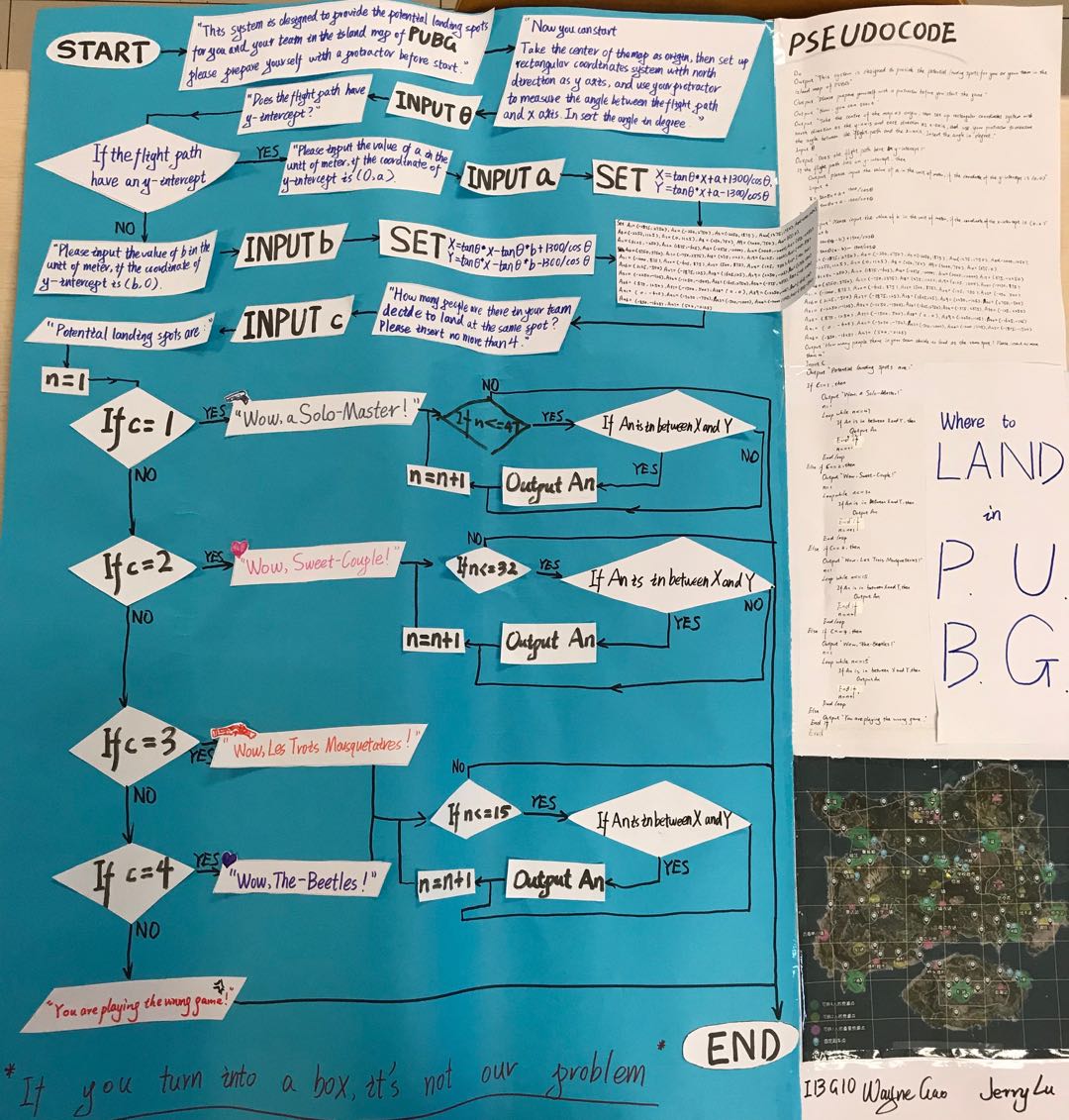
First, let me introduce you the general purpose of our algorithm, which is to provide all the potential landing spot based on the user input in the game PUBG. I am pretty sure that you are familiar to PUBG or just heard of it some time, while, I will introduce this anyway. At the beginning of the game PUBG, every player are send to a jet, which has a linear path above the map. The player has to choose the right time to leave the plane and the right spot to land (Only a few spots in the map has guns and other equipments.) Also, the flying radius of the player is limited. So, we design an algorithm that can automatically produce all the spots with guns the player can get to based on the linear function of the flight path and the number of people who is in the team.

The process of landing in PUBG (retrieved form “PUBG“)

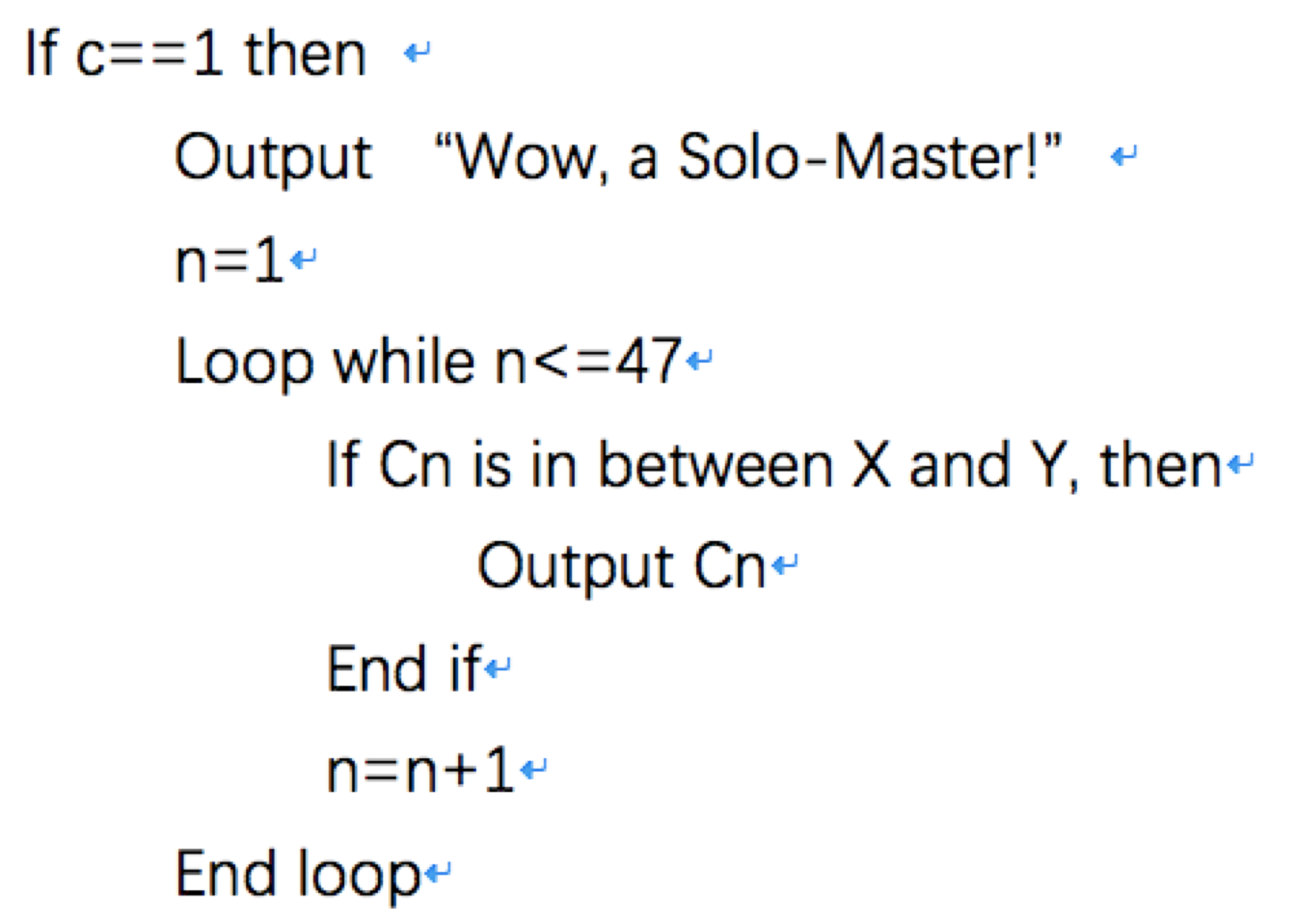
In the experience designing this algorithm, the most difficult process is a loop system that can determine whether the player can get to the spot or not. The basic idea is: we can calculate the area that the player can land based on the linear function of the flight and the flying radius, then we input all the potential landing spots (spots with those equipments) into the computer system, and check if them are in the area one by one. But, this process require a tons of if system which is inefficient and time-consuming. After a talk with Mr. Pete, we figured out the solution: the CORNER MARK. This means while inserting all the spots in the computer in a form of coordinate, we can give each of the spots a corner mark, at then in the “checking section”, we can utilize a loop system with “CORNER MARK=CORNER MARK + 1“, then all the spots in the storage can be checked.

one example of the loop system in the pseudocode (retrieved from “Where to land in PUBG“)

Flowchart

Our poster (retrieved from “Where to land in PUBG“)

After figuring out the pseudocode, creating a poster is not that hard for us, the only problem is that both of us is not that good at those art work, so as you can see our final version of the poster is not that attractive. While creating this poster, another concept that influence me a lot is that if there is a “INPUT …” down below, there must be a “OUTPUT ‘Please input …'” above. This is because while designing a computer program, if you want the user to insert a number for example, you have to ask the user to do so, or they will have no idea what they are going to do.

Hierarchy of the Software

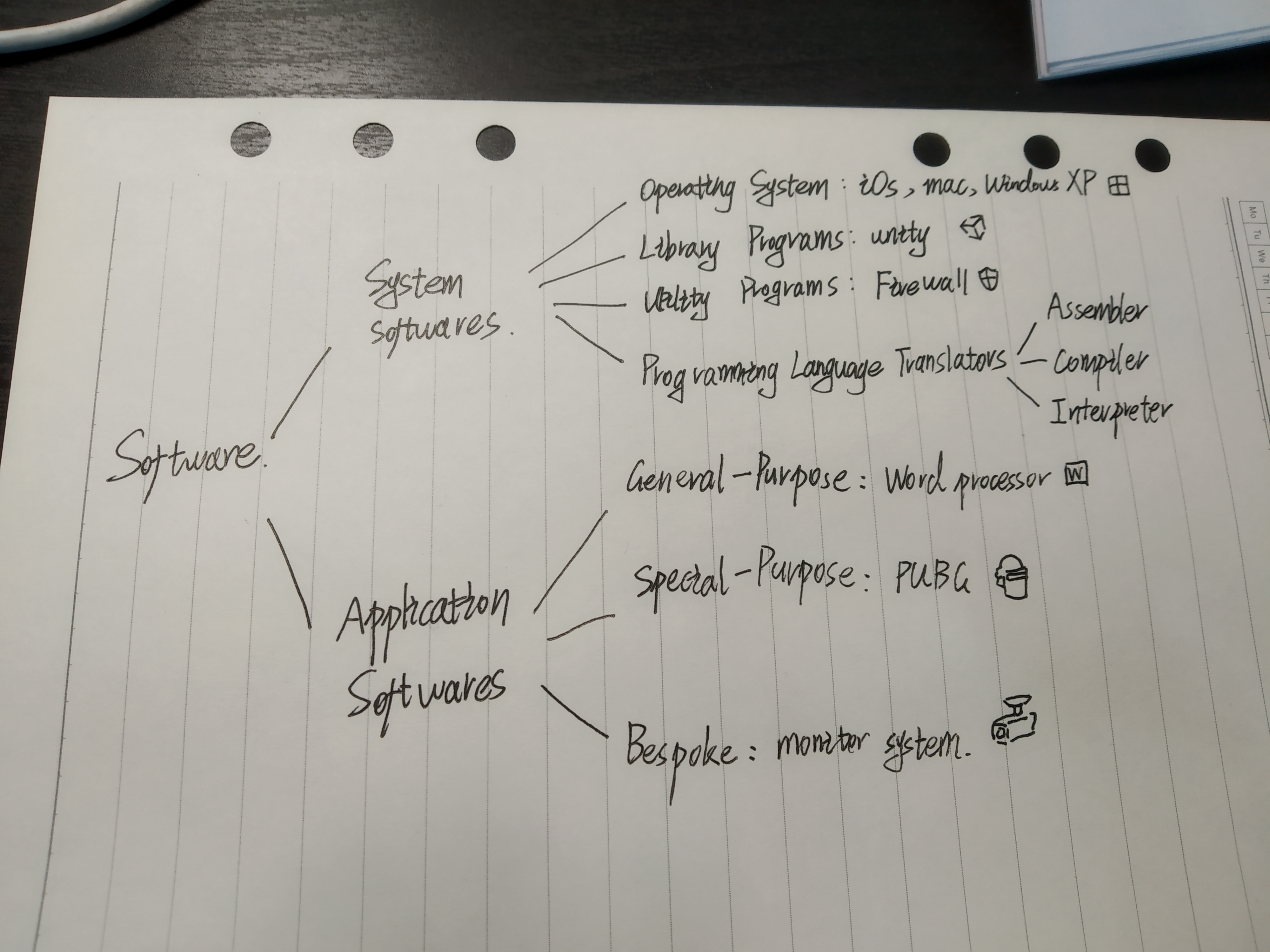
Software in the layers of computing system is divided into two parts: Operating systems and applications. While, in this class, we had a much more detail-oriented classification on the software: Softwares are divided into SYSTEM SOFTWARES and APPLICATION SOFTWARES. And system softwares contain operating system, library program, utility program and programing language translator, while application softwares contain general-purpose

Hierarchy of Software (retrieved from “CS class activity“)

We also watched a video on Youtube COMMON CRAFT about the computer softwares. In that video, the narrator made an example: “The problem with computers is that most of us do speak their language, we need a translator, something that can understand our needs and put the computer to work for us, the translator is a kind of software.

System Software

Introduction

System software is a software designed to operate the computer hardware and to provide a platform for running application software.

–Mr. Pete

System softwares (especially the operating system) operate directly with the computer hardware, and provide a platform for application software. By this, it means, while the user are utilizing the application softwares, the application softwares will first operate with the system softwares then through system softwares the computer hardwares can be utilized. Another thing is that most of the system software are pre-loaded into the computer, which means you don’t have to download them from website or buy them from a computer program store.

Operating System

Operating Systems are a collection of programs that make the computer hardware conveniently available to the user. Just like what I said before, when the user is trying to utilize the hardware, operating system is the pathway that the user has to go through.

It hides the complexities of the computer’s operation. This means, some program can run automatically in a operating system, because if the user has to turn on them one by one, it is time-consuming and super inefficient.

It is an interface between the application software and computer. Like what Mr. Pete said, the operating system provide a plant form for the application softwares to operate with the hardwares. So, without the operating system, the application programs would be unable to communicate with the computer.

MAC Operating System (retrieved from”Wayne’s Mac“)

One example is the Mac Operating System like mine (I haven’t updated it for about one year, LOL.) There are a set of programs there in the operating system. One example of operating with the hardware through the operating system is that, each time I want to connect my BlueTooth Headphone with my MacBook, I have to open the “Setting”, which is definitely a program inside the operating system, and then operating with the communication hardware to get access to the BlueTooth.

Library Program

A library program is a collection of compiled routines/functions that other programs can use. It contains code and data that provide services to other programs.

–Mr. Pete
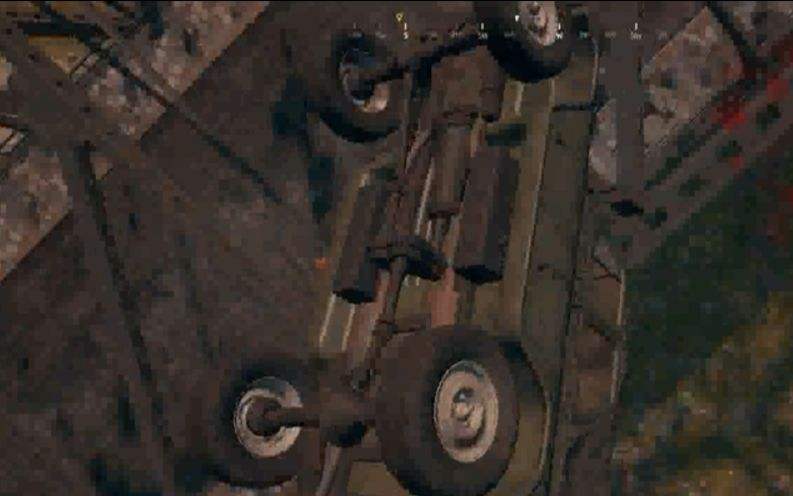
The game engine that PUBG is using is an example of Library Program (retrieved from “PUBG”)

One example is the physics engine of the game PUBG, Mr. Pete has said “Computer game developers often buy graphical libraries to speed up development. This will allow them to quickly develop a good looking game that runs on the desired hardware” While, the developers of PUBG also buy the physics engine to speed up the development of the game, the physics engine enable the developer to use the data and code such as “What will be car react when it has a crush on a rock” conveniently, and sometimes these physics engine may have some problems, and that’s why you will “fly” while driving in PUBG.

Utility Software

Utilities are programs that perform a very specific task related to working with computers. They are small, powerful programs with a limited capability. They are usually operated by the user to maintain a smooth running of the computer system

— Mr. Pete

While, one example of the utility software is the virus scanner, it perform a very specific task: scanning the virus inside your computer, so you can not play a video or editing a song by it. The only job it do is scanning the virus, so it is relatively small and powerful with a limited capability (despite from 360, that thing is huge!!!) As a virus scanner, it definitely maintains the smoothing running of the computer system.

During the class we always can not differ utility softwares and specific-purpose application softwares. While, the main difference is that the specific-purpose application softwares are relatively more powerful in their functions and less close related to operating system and hardwares.

Translator

It is a software that allows new programs to be written and run on computers, by converting source code into machine code.

–Mr. Pete

So the Programming language translator does not translate what you said which is pure English into machine code which is “01010101001”, it translate high level language such as C++ or Java, which contain English words like “INT” or “IF” that help the programmer to easily understand and code into the machine code “01010001001010”, there are mainly three types of translator softwares:

  • Assembler is a program that translates an assembly language program into machine code
  • Compiler is a program that takes a program in a high-level language, the source code, and translates it into object code all at once.
  • Interpreter analyses and executes each line of a high-level language program one line at a time. (program has to be interpreted each time it is run as no object code is generated)

We then watched a video introducing the main difference between compiler and interpreter. The compiler translate the code all at once, which is more efficient, but if there is an error in the code, the programmer cannot fix that until the whole process is done. While Interpreter can translate the high-level language one by one, although it is slow, the programmer can change the untranslated code at any time he wants.

One screenshot from the video (retrieved from “the INTERPRETER and COMPILER“)

Application Software

Introduction

It allows users to perform non-computer tasks. It is a software designed to help the user to perform specific tasks, such as writing a letter or processing orders. It is designed for end users to perform tasks that they consider useful.

–Mr. Pete

Another important thing to mention, application softwares cannot get access to the hardware by themselves, they have to go through system software. Also, most of the application softwares have to be download from website or bought from stores.

General purpose application softwares

General-purpose software is a type of software that can be used for many different tasks, and that’s why it is called “General-purpose”.

One example is the POWERPOINT, or any presentation softwares such as keynotes and e.t.c. You can not only create a presentation by them, it is also possible to create a video clip or a set of posters.

A short video I made by Powerpoint (retrieved from “Fight or Flight“)

Special purpose application softwares

It is a type of software that created to execute one specific task.

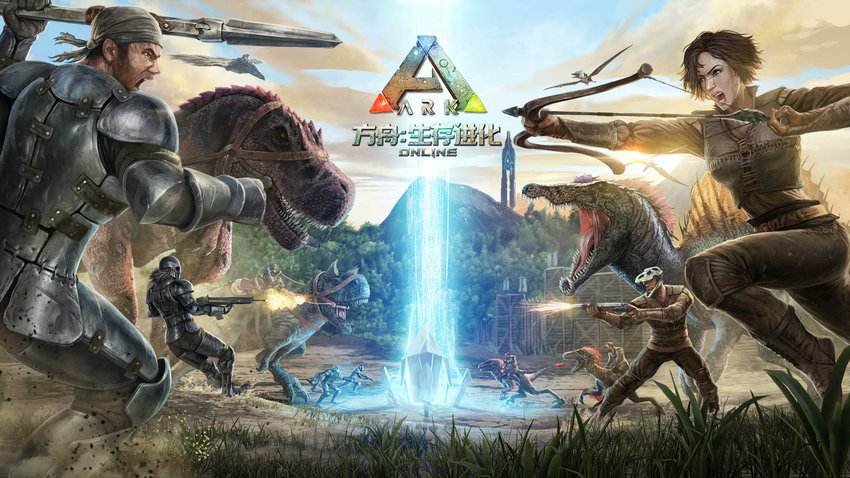
Games are special purpose application softwares, such as PUBG, it only preform one task: Letting the player playing the game. Other examples are Minecraft, Battlefield, ARK and Conan Exiles.

The game ARK is a special purpose application software (retrieved from “ARK”)

Bespoke spftware

Bespoke software is tailor made for a specific user and purpose. Which means they are designed specifically for very different purpose. One example is the monitor system in our school, it is definitely not download form some website, but designed by the company which sells the monitors to our school.

Conclusion and Reflection

This week, we learnt a lot about the classification of softwares. The one that I reflected the most is the difference between system softwares and application softwares, at first I thought softwares are equal to applications, after this class, I understood that there are different kinds of softwares some are more closely related to the hardware some are not.

Another reflection is while designing the algorithm and flow chart poster. I found that programming or produce a good program require a lot of ideas and hard work. The corner mark technic seems easy, but it takes time for us to figure it out. And a good program is the one that is efficient, so it is necessary to pay such attention on replacing a tons of “If system” by a single one of “Loop system”.

And I will see you in the next BLOG, PEACE!!!!!!!!!

REFLECTION on ALGORITHM (4May-10May) — May 9, 2019

REFLECTION on ALGORITHM (4May-10May)

Introduction

What sup guys, this is Wayne and I am about to start this week’s blog, please remember to subscribe my channel to see the new updates. Last week we spent most of the time understanding one of the most important term in computer science, the Algorithm. This blog will contain the following parts:

  • 1. The basic introduction on Algorithm.
  • 2. Design an Algorithm.
  • 3. Different ways to express Algorithm.
  • 4. Explanation on some Algorithms introduced in “The Secret Rules of Modern Living: Algorithms”.
  • 5. In-class-activities that relates to Algorithm.
  • 6. Conclusion and Reflection.

Basic introduction on Algorithm

The definition of Algorithm

Algorithm is a series of step-by-step clear instructions to solve a problem within a specific amount of time in the most effective way.

—Mr. Pete

To carry out a specific task, some computer programs have to contain algorithms that show specific instructions in a specific order. The order of instructions in an algorithm is very important, because it indicates which step of processing or output the computer should preform in specific occasion. For example, if we design an algorithm that can preform simple addition of two number, the process of calculation has to be after the user input the numbers.

Another thing is that there are maybe tons of different algorithm which can solve one individual problem, but there by exploring the different approaches existing, we can find the algorithm that is most suitable for that issue. For example, if we want to watch the NBA game on TV, there are many algorithms that can address this problem. Like, algorithm A: Go through the TV channel one by one until we find the sports channel which is displaying the basketball match. Algorithm B: Choosing the category “Sport” and search for the channel that has the game on. Both algorithms can actually work, but if the time is limited, or if you do not want to miss the 3-pointer from Harden, then it maybe more reasonable to use the second algorithm which is more efficient than the first one.

Different Algorithm that solve the same question (retrieved from “Baidu“)

Some properties and characteristics of Algorithm

Finiteness:An algorithm must always terminate after a finite number of steps… a very finite number, a reasonable number” This means that as an algorithm, the number of instructions contained by it should be limited, and an algorithm with infinity steps is both impossible and inefficient.

Definiteness: Each step of an algorithm must be precisely defined; the actions to be carried out must be rigorously and unambiguously specified for each case” This means that the instructions included by an algorithm should be clear and precise, because even in a simple step, an un-defined instruction can cause an error that may effect the whole system and cause it not-functioning appropriately.

Input:… quantities which are given to it initially before the algorithm begins. These inputs are taken from specified sets of objects” This is because an algorithm is designed for the user to address a specific problem but without an input an algorithm can not provide specific solution in the situation, which makes it less intelligent.

Output:quantities which have a specified relation to the inputs” the output is usually the result or the solution to the issue.

Effectiveness: “… all of the operations to be performed in the algorithm must be sufficiently basic that they can in principle be done exactly and in a finite length of time by a man using paper and pencil” It is very crucial that the algorithm should be efficient and effective, because it has to be preformed in some way, and the when it is operating, the time matters a lot.

Design an Algorithm

Computational Thinkings

To design an algorithm, we first need to understand the whole process of solving a problem, so in class, Mr. Pete introduced us the Computational Thinkings, which contain the following parts:

  • 1. Decomposition
  • 2. Abstraction
  • 3. Pattern Recognition
  • 4. Algorithm

For example, if we want to select a film to watch at Saturday night, viewing all those fantastic films on the Internet we can first break down those films online into individual ones, which can help us in further steps and this is called “Decomposition.” Next, we group different  films into different categories, like action movies, super-hero movies and e.t.c. We called this “Abstraction.”  Then, we start to recognize a pattern, like most of the Marvel Film has a relatively high quality, films directed by Mr.Nolan have attracting plot… which is obviously a “Pattern Recognition.” Finally, we can list all the necessary ways to look for a film to watch in an logical way and produce an “Algorithm.”

Avenger: Endgame (retrieved from “Avenger: Endgame“)

Designing an Algorithm

There are two main areas to look at: The first thing is the big picture-what is the final goal? Because with considering the final goal, we understand the purpose of the whole algorithm, and may explore the most efficient way to the purpose much easier and faster.

The second thing is individual stages – What barriers/obstacles need to be overcome on the way? While realizing the challenge standing in our way, we can come up with specific solution to address those obstacles. For example, if we are writing an algorithm for choosing a film to watch in China, then one barrier is that many films rating R and PG-13 in America didn’t pass the Chinese film Censorship System which means they are not available. To overcome this obstacle we have to add one instruction into the algorithm “turn on the VPN.”

Understanding the Problem

Having a full understanding on the problem before design the algorithm can clarify the purpose of the algorithm and provide a more well-organized vision of the algorithm we need to design. Here are some questions that need to be clarify:

  1. What are the inputs into the problem?
  2. What will be the outputs of the problem?
  3. In what order do instructions need to be carried out?
  4. What decisions need to be made in the problem?
  5. Are any areas of the problem repeated?

Different ways to express Algorithm

Natural Language

While using natural language as an algorithm to a person, it is just basic different orders arranged in a correct order. However, when expressing an algorithm to a robot, the robot will preform: Fetch the Instruction, the robot receive the instruction or input from the user; Decode the Instruction, the robot decode the input from English sentence into computer language; Execute the Instruction, the machine just preform the instruction according to the algorithm it decoded.

You can use natural language to give instructions to Siri (retrieved from “Siri“)

Pseudocode

Pseudocode is a planning tool that allows us to design the flow of a program prior to writing the code, which consists of a series of English-like statement that describe a task or algorithm

–Mr. Pete

The Pseudocode is a Programming-language-like language, which used similar grammar as Java and C++, that mainly focus on the flow of the instructions. Expressing the Algorithm through Pseudocode can help us understand the order of instructions computer will preform when running the program, it also helps us to have a deeper understanding on the computational thinking, because it provide a language similar to the programming language.

Some Common Pseudocode Notations are:

  • input – indicates a user will be inputting something: input NUM
  • output – indicates that an output will appear on the screen: output “please input a number”
  • while – a loop (iteration that has a condition at the beginning): while NUM<=1
  • for – a counting loop (iteration)
  • repeat–until – a loop (iteration) that has a condition at the end
  • if–then–else – a decision (selection) in which a choice is made: if A<=4 then output “wrong answer” else then output “You are correct”

Other ways to express Algorithm

There are many other ways to express an specific algorithm, like the Flow Chart, or Programming language like Java and C++. Those will be covered in the future blogs.

Explanation on some Algorithms introduced in “The Secret Rules of Modern Living: Algorithms”

Face Detection Algorithm

Face Detection Algorithm help to keep the human face in the photograph in focus. To achieve this goal (To solve this problem), the output it preform is finding a human face and produce a box around the person’s face. The algorithm works by scanning the image, looking for four abstract patterns associated with a face. When these are detected one after the other, then the algorithm indicates it finds a human face.

Face Detection Algorithm (retrieved from “The Secret Rules of Modern Living: Algorithms“)

Page Rank Algorithm

Page Rank is the heart of google search engine. When you search for something on Google, there will appear thousands of pages related to the word. What Page Rank do is to rank those pages so the one at the top is the one you are most likely to be interested in to increase the quality of web-search. In this algorithm the input is the web’s link, and it will rank the website which is linked by a lot of other website higher, and the website which is linked by another website with lots of links higher. And when the input changes the ranking will be updated, because the importance of a page is related to the importance of the page that link to it.

Page Rank Algorithm (retrieved from “The Secret Rules of Modern Living: Algorithms“)

In class Activities that related to Algorithm

The Algorithm Magic Show

Our magic show is called “Red and Black Mind Meld.” I will not talk about the details related to this magic show. The first step is to create a model of the trick. That involves abstraction. Abstraction just means focus only on the information about the trick that matters, while hiding all the detail that doesn’t. A model is just an abstraction of a part of the word we are interested in. To generalize the mechanism behind this magic show is if there are 52 cards (26 black and 26 red) and we got R1, R3, R4, B1, B3, B4, 6 pile of cards in total, then we have a serious of equations:

The Mechanism behind the Magic Show (retrieved from the “Red and Black Mind Meld“)

After modeling this trick we can see it is a lot more easy to understand why the red pile3 will have a same number as the black pile 4. And behind this magic show, it is all algorithm that provide step to step instructions for the magician to preform on the stage, which contain logical reasoning and mathematical calculation that brings the show to address the problem: getting the same number of cards in the two piles.

Role-Play Activity

In this activity, one student will give detail algorithm to another student who got his or her eyes covered. The task is to get a bottle on the desk without stepping on the pen which is placed on the ground. And I discovered that the more clearly the instruction is the more efficient the whole process will be. For example “Turn to your left for 30degrees” is much more better than “Turn Left.” And this taught me that when writing an algorithm, one of the most crucial thing is to write down the most precise instruction as I can.

LIGHTBOT Homework

Then we did a homework related to algorithm which name is LIGHTBOT. The game is mainly controlling a robot by giving a set of step by step instructions to light up all the blue square in the game. In this homework, I have a better understanding in the loop system, which means a cycling system that repeat itself again and again, until the work is done.

The certificate of completion (retrieved from Lightbot)

Conclusion and Reflection

In this week I learnt a lot about algorithm.

The one thing that I thought is the most important thing that I learnt within this week is that, the most crucial thing for an successful algorithm is its flow. Because it is the flow that determine the order of instructions and how will the program process with the input data. So, in the future while writing Pseudocode or actual programming language, I will pay more attention on what is actually going on behind the instructions and how does the computer preform those instructions one by one and finally lead to an end. I think this will benefit me a lot in the learning of Pseudocode and Flow Chart in the future.

Thank you soooooooooo much, and see you next time!!!!!!!

REFLECTION on CPU and BINARY REPRESENTATION (30March-5April) — April 10, 2019

REFLECTION on CPU and BINARY REPRESENTATION (30March-5April)

Introduction

Greeting fellows, thanks you for following my blog (Or you are just dear Mr. Pete checking my homework which I also appreciate a lot). Last week we spent most of the time on how things going on inside a computer which mainly means the work done by CPU (we watched a video and preformed a roleplaying). Then we spend some time focusing on the Binary Representation and a brief introduction of Coding system. This blog will contain the following parts:

  • 1. Basic introduction on the components of CPU (CU/ALU/REGISTER/BUS) and their functions.
  • 2. How does a computer (Mainly the CPU) work in steps (including the ROLE-PLAY activity and video).
  • 3. How does a Binary System work (including the ROLE-PLAY activity) and how to convert between Binary System and Decimal System.
  • 4. Basic introduction on ASCII and UNICODE.
  • 5. Conclusion and Reflection.

Basic introduction on the CPU

What is a CPU?

A central processing unit (CPU), also called a central processor or main processor, is the electric circuity within a computer that carries out the instructions of a computer program by performing the basic arithmetic logic, controlling, and input output operations specified by the instructions.

–The Great WIKEPEDIA

From this large quotation according to the wikipedia, we can have a basic concept of CPU (A.K.A. Central Processing Unit). I will “simplify” this definition into “CPU is a set of devices which takes input from the input devices and processes it with instructions by preforming arithmetic (calculation), logic, controlling operations and then sends the output to output devices.”

An image of CPU (retrieved from Baidu Picture)

If your body is a computer, then your brain will be the CPU, according to Mr. Pete. Let’s further develop this analogy, when there is an input of somebody shooting bullets at you from your eyes, your brain will quickly search for the solution in your memory that “What should I do when I am about to being shot?” and the answer it gets is “DODGE!“, so it send the signal to other parts of your body to preform the output of dodge.

Although you are more likely to be shot in this story, except that you are Neo and we are in the MATRIX, because your brain can not process this instruction in a “BULLET TIME“. The brain of computer or as I say CPU can. It is responsible for executing a sequence of stored instructions called a program really fast. So, maybe you don’t need to become Neo to safely get out of this situation, just become a computer, that’s much easier.

The BULLET TIME (retrieved form movie the Matrix)

Main components of a CPU and their functions.

The main components of a CPU are: CONTROL UNIT (A.K.A. CU), ARITHMETIC LOGIC UNIT (A.K.A. ALU), and REGISTER. In this part I will simply introduce its function and it will be further demonstrated in the next part “How does a CPU work”

CONTROL UNIT——It is the control center of the CPU and the whole computer which includes Instruction Register, Instruction Decoder, and Operation Controller. Control unit will get access to different instructions from the Memory according to programs coded by people at the first place and place them into the Instruction Register. Then, it will use the Instruction Decoder to decode the instruction and make sure what it is going to do. Utilizing the Operation Controller, control unit send signal to specific devices to preform the task. To conclude, control unit makes decisions and sends appropriate signals down its lines to other parts of the CPU. It controls the timing of operations in the computer and controls the instructions sent to the processor and the peripheral device.

ARITHMETIC LOGIC UNIT——a logical circuities which can preform set of arithmetic calculations and logic calculations. It is an execution unit of the CPU, preforming binary calculation (Plus, subtract, multiply but without divide) , using logic pathway–“And Gate” and “Or Gate”.

REGISTER——When executing a instruction, the control unit will first search for the specific instruction by program from the storage and save the data in the Register (Then the instruction will be transferred into the control unit’s Instruction Register). It provides temporary memory storage location within a CPU.

BUS——although bus is not a component that only belongs to the CPU, it also play an crucial role in the operation of the CPU. It is a public communication tunnel all the way inside the computer used as a channel transferring data and signal.

How does a computer (Mainly the CPU) works in steps

the VIDEO of how a computer works

As we have learnt from the previous course, computer works in a specific model: INPUT, PROCESSING, and OUTPUT. But in this class we had a more detailed understanding on what is going in the processing part. We watched a video clip, Inside Your Computer, which mainly focusing on how the CPU deals the an instruction and preforms a whole process of computing while co-working with other devices.

One screen shot from the video Inside Your Computer (retrieved from youtu.be/AkFi90lZmXA)

In this video we knew that: when you just simply click your mouse, the computer will process hundreds of works. First, the click on the mouse turns into a signal as an Input entered the CPU. The Control unit will stop everything it is doing to address this coming signal. It then decodes the signal and search for data and information about the instruction it should preform from the storage according to the program. When the specific instruction is targeted, it will be transferred to the Register for temporary storage “by Bus“. And the Control unit then send the instruction to other devices which may preform the Output. While in this whole process the ALU is continuing calculating to help the process function well.

the ROLE-PLAY activity

To have a in-depth understanding of how the components of CPU co-works with each other, we had a role-play activity. In this activity each team has 5 individual students performing the job of CU, ALU&Register, Display, CPU Bus, and CPU Clock. The final purpose of this instruction is to draw specific spot on a cross-lined paper (Display). In a specific round, the CU first sends an instruction to the Bus, and the bus carries the signal to the ALU, the ALU preforms calculations according to the instruction (ALU may have to utilize the data stored in the register in this state). Then, the ALU provide the result of calculation to the bus and the bus carries the result to display which eventually Plot the point on the graph. During the whole process, the clock will record of the total work times of all the component.

Add 4 to X

Add 6 to Y

Plot (X, Y)

–A possible example of the instruction
The final display of the ROLE-PLAY (retrieved from DEAR MS. SOPHIA)

From this role-play activity we can know that, the simple version of how a CPU works is that: CU receives a signal-CU decodes the signal-CU sends the signal “Search for the instruction next” to the bus- bus carries the signal to register-register gets the right information from the storage- bus carries the data back to CU- CU decodes the data and sends the instruction to the bus- bus carries the instruction to the ALU- ALU calculates the result- ALU sends the result to the bus- bus carries the result to Display- Display shows the final output.

In addition, we have some more extra knowledge learnt in this activity. First, the computer doesn’t understand what is going on, they are just doing their own job. Second, from a computer perspective they are just executing some instructions. Third, if there is a mistake in this program, the computer system will keep executing the further instructions.

How does a Binary System work

Data and Information

Data is the raw material, the numbers that computers work with; Information is words, numbers and pictures that you and I can understand.

–Mr. Pete

In this case, to perform information in a computer, it has to be represented in the form of data, which means numbers. But it is much harder than it sounds like, because data in computers is stored and transmitted as a series of zeros and ones. So, how can those zeros and ones represents all the numbers we are using in the decimal system?

the ROLE-PLAY activity (how to convert numbers from decimal system to binary system)

To answer this question, we had a role-play activity. With 5 students on the board, each of them gets a piece of paper which reads 1, 2, 4, 8, 16 from right to left, the numbers they are holding are mainly is different power of 2, like 1 is 0 power of 2, 8 is 3 power of 2…… And when they want to represent a number like 14, the student with 2, 4, 8 will raise up their paper which means at those spots it will be “1”, and for the other 2 students, at their position the number in a binary system will be “0”. So, 14 in a decimal system will become “01110” in binary system. And with all those 5 students on the board, they can represents all the natural numbers from 0-31.

A homework which indicates how to convert numbers between decimal system and binary system (retrieved from Mr. Pete)

When we know how to express numbers in binary system, then we can express words or as I say letters. It is simple to just set that 1 represents “a” , 2 represents “b”…… which means we can use only 26 numbers to represents all the words in English (which means from 1-11010).

Well, there are a lot of alternative ways to code a information in only two expression, like if we say that a “WAY” represents 0 and a “NE” represents 1, then we will be talking like “WAYNENENEWAY WAYNEWAYNEWAY WAYWAY…..” however, our computer will spends centuries to figure out what we are trying to say, they just accept the binary system, so let’s just keep it simple.

Basic introduction on ASCII and UNICODE

At the end of this class, Mr. Pete leave us with a homework: check out what does ASCII and UNICODE mean. According to research that we know, ASCII (A.K.A American Standard Code for Information Interchange) and UNICODE (A.K.A. unicode) are two most common coding language for computing.

It is a computerized coding system based on the Latin alphabet, mainly used to display modern English and other Western European languages. It is the most versatile system today and is equivalent to international standards.

Unicode is created to solve the limitations of traditional character encoding schemes. It sets a uniform and unique binary encoding for each character in each language to meet the requirements of text conversion and processing across languages and platforms.

A logo of Unicode (retrieved from Wikipedia)

The main differences between ASCII and Unicode

1.ASCII uses an 8-bit encoding while Unicode uses a variable bit encoding.

2.Unicode is standardized while ASCII isn’t.

3.Unicode represents most written languages in the world while ASCII does not.

4.ASCII has its equivalent within Unicode.

Conclusion and Reflection

In this week, we have learnt a lot on how the CPU works.

First, in the CPU role-play part, my role was bus, and all I did was carrying the instruction from one component to another, which was surprisingly boring for me, because I didn’t understand what I am doing. And it was just like what a computer is doing. Because in the CPU all the component are just following the instructions, so they have no idea what they are going to produce eventually. It means nothing for them to plot a imagine of Star Lord or a imagine of Batman.

Second, when I was carrying the data round, all I saw was just some random numbers but without a full picture, so it indicates that as a computer it does not understand what it is doing. This role-play activity really helps me to have a better understanding on the how does the CPU work.

Thank You So Much, And I Wish You A Good Day!!!!!!!:)

WAYNE’S FIRST BLOG (HOW ORIGINAL!!!!!) — March 5, 2019

WAYNE’S FIRST BLOG (HOW ORIGINAL!!!!!)

About WAYNE

Welcome aboard, this is Wayne’s Blog and he hopes that you enjoy spending time here.  In Wayne’s First Blog, he is going to give a “briefly” Introduction about himself and what’s this blog for.

Wayne was born in Houston, Texas. However, he went to Beijing, China after his parents graduated from the Texas A&M and couldn’t find a job. Now, he is in the national department of the best school in Beijing, BNDS, nay, the whole world. Wayne is continually losing his hair in the IB program, which is the best program on earth, nay, the whole UNIVERSE!!!

In IB there are no winners, only SURVIVORS.

Wayne is a typical comic-addicted person: no matter MARVEL or DC, he likes it both. (However, he likes DC a bit more. You can see that by his name.) For his favorite superhero, he cannot pick from the Star Lord and the Batman (He has more similarities to the first one, though.)

Bruce Wayne. BATMAN

Wayne is also a sport devotee, even he never did well on that. He is an indispensable member of the school swimming team. He attended the Beijing Teenager Swimming Competition in 2018 as a seeded player of the 50m butterfly stroke, and got the 12th place finally (There are only 12 participants, though.) He is also an indispensable member of the IB, AL tenth graders’ basketball team, the Suicide Squad, and played for no more than 5minutes in the group stage of the tenth grader basketball match as a successful shooting guard. He learned FENCING for 7years, and got the 7th place in the Beijing National Teenager Fencing Competition, when he has not yet been cut into pieces by his coach. Wayne is also an enthusiast of BOXING and WRESTLING (Van is his favorite wrestler.), just before he got into a fight and left on a stretcher lately. Recently, he is learning OLLIE, a basic skateboard tricks, which caused him a little bit of cerebral concussion. We will see if he gets it or he dies due to it.

This is OLLIE

Wayne is both a “Si Fei Zhai” (it means a couch-potato, in English) and a backpacker. He is a semi-professional PUBG player, the word “semi” is because his mastery use of VECTOR and sucks at sniper rifle. He is an expert on ARK, and he is the chief of the second biggest tribe in the China Server of ARK, defending an attract from the number one tribe in the America Server and punching back to them recently. On the other hand, he has traveled to 11 countries, and 3 of them were just backpacking with his friends.

The Game: ARK

Wayne is a “Cha Bu Duo” student in school, in English, it means just OKEY. While, let’s don’t talk about business here, maybe the next part.

What does he expect to do about this BLOG

This whole BLOG is for recording WAYNE’s studying of the beautiful, crucial, wonderful COMPUTER SCIENCE!!! So, things he is going to post are more likely to be some sort of study materials, his notes and other important things related to this class.

This whole BLOG is for recording my studying of the beautiful, crucial, wonderful COMPUTER SCIENCE!!! So, things I am going to post are more likely to be some sort of study materials, my notes and other important things related to this class.

HELLO-WORLD, MY FIRST C++

And for those people who are asking “Why you are always using the third-person singular?” and “Will you continue to use that?” While, Wayne will say “Because it is what that makes Wayne WAYNE, and obviously, YES!!!”

BYE GUYS 🙂

Design a site like this with WordPress.com
Get started